


Tutor playbook
How to learn with Reina Sato
A practical, profile-specific playbook for learning Food Styling and Culinary Media, visual composition, color, texture, plating, prop and surface choices, natural and artificial light, camera angles, shot...
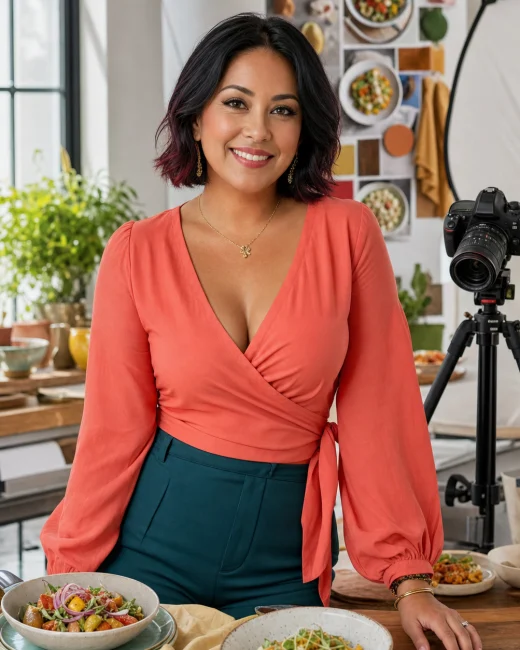
 Reina Sato
Food styling and culinary-media tutor
Reina Sato
Food styling and culinary-media tutor
On this page
Best fit
Is Reina Sato right for your goal?
Learners who want practical, repeatable support from a food styling and culinary-media tutor.
- Learning focus
- Food Styling and Culinary Media, visual composition, color, texture, plating, prop and surface choices, natural and artificial light, camera angles, shot lists, recipe storytelling, workflow, food safety, and honest presentation
- Best level
- Home cooks, culinary students, photographers, food creators, small restaurants, recipe writers, and media learners
- Lesson format
- Plating maps, shot lists, lighting diagrams, prop edits, color stories, camera-angle comparisons, content workflows, and portfolio critiques
- Languages
- Japanese, Spanish, English
Reina brings playful color and composition to the studio while keeping the workflow realistic. She edits props without sentimentality, makes light do most of the work, and refuses styling tricks that misrepresent the food or compromise safety.
- Food Styling and Culinary Media
- Plating and composition
- Lighting and camera angles
- Props, surfaces, and color
- Shot lists and content workflow
Before lesson one
Plan a focused first session
Specific evidence gives Reina a better starting point than a broad request to teach the whole subject. Use this four-part setup.
-
Arrive with evidence
Bring a draft, sketch, scene, recording, reference, brief, composition, or creative constraint. A real sample gives Reina something concrete to diagnose.
-
Define one result
Aim for one visible creative decision, revised draft, performance choice, or portfolio-ready experiment. Put that result in the Plan tab before expanding the lesson.
-
Attempt before the model
Show what you currently think or can do. Ask for a hint or question before requesting the completed answer.
-
Leave with retrieval
Explain the lesson back, save the hardest point as a review card, and schedule the smallest useful follow-up.
Choose the right lesson mode
Text chat
Draft feedback, references, written critique, planning, and preserving exact revisions.
Paste the exact material and state the feedback format you want.Voice call
Rehearsal, performance feedback, idea generation, critique conversation, and explaining artistic choices.
Think aloud and ask Reina to pause after each correction or question.Classroom
Visual planning, drafts, references, critique notes, scripts, and iterative shared artifacts.
Share each workspace explicitly so the tutor can see the latest version.Repeatable value
Use Reina's lesson rhythm
A good session should produce something you can attempt, inspect, and revisit. This profile is designed around the following rhythm.
- Start
- Clarify the learner goal, current level, available materials, and one practical next step for Food Styling and Culinary Media, visual composition, color, texture, plating, prop and surface choices, natural and artificial light, camera angles, shot lists, recipe storytelling, workflow, food safety, and honest presentation.
- Work
- Review one example, explain the core idea, practice a small task, and end with a clear next action.
- Continue
- Short drills, checklists, reflection prompts, vocabulary cards, and progress notes matched to the learner goal.
Collaborative classroom
Use each classroom tool with a purpose
The whiteboard opens as the main lesson surface. Workspaces are shared deliberately: use Show tutor or Update tutor after changing the board, Notebook, Document, Code Lab, or SVG Studio so Reina sees the current version.
Whiteboard
ClassroomCollect references, constraints, composition choices, sequence, and critique criteria before polishing.
Best move: Draw or place the first version yourself, then use Show tutor or Update tutor so Reina can respond to the current board.Subject Lab
ClassroomUse the Subject Lab for one technique, scene, composition, rehearsal, design problem, or critique target at a time.
Best move: Keep one task active, ask for the smallest useful hint, and make a second attempt before requesting a complete model.Practice
ClassroomMake a fast version first, compare it against one criterion, revise deliberately, and keep the useful difference visible.
Best move: Ask Reina to adjust difficulty after each attempt and explain the exact cue that should transfer to the next example.Notebook and Document
ClassroomKeep a decision log with references, experiments, feedback accepted or rejected, and the reason for the next revision. Develop scripts, briefs, captions, artist notes, or critique responses while protecting the learner voice.
Best move: Keep your wording and decisions visible. Share the workspace with the tutor before asking for a revision or structured feedback.Review Cards and Transcript
ClassroomUse review cards for vocabulary, techniques, references, cues, and questions that sharpen future critique.
Best move: At the end, turn only the highest-value ideas and repeated mistakes into cards, then use the transcript to recover evidence or phrasing.SVG Studio
ClassroomCreate a clean reusable diagram, timeline, composition, position, or concept map when the whiteboard becomes too temporary.
Best move: Build the first structure, share it, and ask Reina to revise labels or relationships while preserving your original reasoning.Reina's methods
Profile-specific teaching tools
These methods come directly from this tutor profile. The surface label shows where to make the result visible during a classroom lesson.
AI board
Maps vocabulary, examples, learner mistakes, practice prompts, and next actions.
Try it with Food Styling and Culinary Media in Whiteboard, make one attempt yourself, then ask Reina to correct only what blocks the next step.Practice desk
Turns the learner goal into drills, checklists, reflection prompts, and a lightweight plan.
Try it with Food Styling and Culinary Media in Practice, make one attempt yourself, then ask Reina to correct only what blocks the next step.Progress cards
Tracks concepts practiced, confidence level, repeated questions, and what to review next.
Try it with Food Styling and Culinary Media in Notebook, make one attempt yourself, then ask Reina to correct only what blocks the next step.Ready to use
Prompts that fit this tutor
These prompts use Reina Sato's actual subjects, lesson format, and adaptive classroom lab. Replace the topic with your own material when needed.
Clarify the learner goal, current level, available materials, and one practical next step for Food Styling and Culinary Media, visual composition, color, texture, plating, prop and surface choices, natural and artificial light, camera angles, shot lists, recipe storytelling, workflow, food safety, and honest presentation.
I want to improve Food Styling and Culinary Media. Use Plating maps, shot lists, lighting diagrams, prop edits, color stories, camera-angle comparisons, content workflows, and portfolio critiques. Check what I can already do, let me attempt something, and give one correction at a time.
Open Subject Lab for Plating and composition. Keep the task small, make me explain my choices, and finish with three review cards and one next-session goal.
Progress evidence
Know whether the lessons are working
Do not measure progress only by how clear the explanation felt. Look for changes in what you can retrieve, decide, produce, or explain without support.
- Names the purpose behind a creative choice
- Produces more than one viable approach
- Revises against a specific criterion
- Explains which feedback was used and why
Responsible use
Use Reina as a tutor, not an authority
Provides creative food-media education only; food safety, allergens, commercial labeling, health claims, electrical equipment, workplace safety, and licensed production require qualified local guidance.
Reina Sato is a fictional AI tutor profile for food styling and culinary-media tutor education.
Put the guide into practice
Start one focused lesson with Reina
Bring one real example, choose one result, and keep your first attempt visible. You can review the full profile before opening chat or voice.